A local model needs room for three things: its weights, a KV cache for every token of context it is allowed to hold, and a working buffer of a few hundred MiB. The weights take parameters × bits per weight ÷ 8 bytes, and a "4-bit" GGUF file is nearer five bits per weight once its scales are counted, so Llama 3.3 70B at Q4_K_M is a 39.6 GiB file and does not fit on a 24 GB card before any context is added. The KV cache grows in a straight line with context length, at a rate set by the model's config.json. Runtimes reserve it for the whole context window when the model loads, not as the conversation grows, which is why a small 4-bit model can fill a card: on our 16 GB Mac, a 2.3 GiB Qwen3 4B file took 91% of the memory the GPU could use before it had read a word, because llama.cpp gave it a 59,136-token window.
This guide shows how to work out both numbers for a specific model, how big a window fits on 12, 16 and 24 GB cards for popular models, why calculators overstate the cache for most new models, and what llama.cpp, vLLM and Ollama do with the memory you give them. Our hands-on runs were on a Mac with llama.cpp only; the NVIDIA figures are calculations and documented behaviour, not measurements.
The formula: weights plus KV cache plus overhead
GPU memory for one model, serving one conversation, is:
- Weights: parameters × bits per weight ÷ 8. This is fixed once you pick a model and a quantisation.
- KV cache: 2 × layers that keep a cache × KV heads × head dimension × bytes per number × tokens of context. The 2 is one key and one value. This scales with the context window you configure, not the length of the prompt you send.
- Compute buffers and runtime overhead: scratch space for the forward pass, plus whatever the runtime keeps back. In our llama.cpp runs the compute buffer was 301 to 306 MiB; vLLM also counts CUDA graph memory and activation peaks here.
Everything in the KV cache formula is in the model's config.json on Hugging Face: num_hidden_layers, num_key_value_heads and head_dim (or hidden_size ÷ num_attention_heads when head_dim is missing). For Qwen3-4B-Instruct-2507 that is 36 layers, eight KV heads and a head dimension of 128, so each token costs 2 × 36 × 8 × 128 × 2 bytes = 147,456 bytes, or 144 KiB, at 16-bit precision. The same arithmetic gives 320 KiB per token for Llama 3.3 70B, the figure our prompt caching explainer uses for the similar Qwen2.5-72B.
Graphics cards and Macs are sold in GB but their memory comes in binary units, so a "24 GB" card holds 24 GiB, and nvidia-smi and llama.cpp report MiB. We use GiB and MiB for every figure we calculate or measure.
The formula is exact for models where every layer uses ordinary grouped-query attention. For models that mix in sliding windows, compressed latents or linear layers, it overstates the cache, sometimes by a factor of 71; the section on attention designs below covers those.
Will it fit? A rule for sizing a model to a card
Subtract the GGUF file size plus 1 GiB from your GPU's memory, then divide what is left by the model's KV cost per token. The result is the largest context window that fits. If it is smaller than the context your work needs, pick a smaller model or file, quantise the cache to q8_0, which roughly doubles the window, or accept slower generation with some layers in system RAM.
The 1 GiB has to cover the compute buffer, the CUDA context and anything else using the card, such as a display, so treat the windows below as ceilings. These two functions do the arithmetic for a model whose layers all use full attention; they are the code behind the tables, from the script in our test library:
import json

def kv_bytes_per_token(config_path, bytes_per_number=2):
    """KV cache per token when every layer uses full attention."""
    c = json.load(open(config_path))
    c = c.get("text_config", c)  # multimodal models nest the text config
    head_dim = c.get("head_dim") or c["hidden_size"] // c["num_attention_heads"]
    return 2 * c["num_hidden_layers"] * c["num_key_value_heads"] * head_dim * bytes_per_number

def max_window(gpu_gib, file_gib, per_token, margin_gib=1):
    """Largest context window that fits beside the weights."""
    return int((gpu_gib - file_gib - margin_gib) * 1024**3 / per_token)

per_token = kv_bytes_per_token("config.json")  # Qwen3-32B: 262,144 bytes
print(max_window(24, 18.4, per_token))  # 18841
For the newer attention designs, count only the layers that grow. For Gemma 3, count only the global layers (10 of 62 in the 27B, eight of 48 in the 12B) and add a fixed 416 MiB or 320 MiB for the window layers; for gpt-oss, count half the layers; for DeepSeek's latent attention, count 576 numbers per layer instead of keys and values per head; for Qwen3-Next, count its 12 attention layers and add about 38 MiB. The section on attention designs explains each.
Popular models for one consumer GPU, at Q4_K_M with a 16-bit cache, from their configs and Hugging Face file listings on 13 October 2026:
| Model | Q4_K_M file | KV per token | KV at 32,768 tokens | Window on 12 GiB | Window on 16 GiB | Window on 24 GiB |
|---|---|---|---|---|---|---|
| Llama 3.1 8B Instruct | 4.58 GiB | 128 KiB | 4.0 GiB | about 52,600 | about 85,300 | its full 131,072 |
| Qwen3 8B | 4.68 GiB | 144 KiB | 4.5 GiB | its full 40,960 | its full 40,960 | its full 40,960 |
| Gemma 3 12B IT | 6.80 GiB | 64 KiB + 320 MiB | 2.3 GiB | about 63,700 | about 129,200 | its full 131,072 |
| Qwen3 14B | 8.38 GiB | 160 KiB | 5.0 GiB | about 17,100 | its full 40,960 | its full 40,960 |
| Mistral Small 3.2 24B | 13.35 GiB | 160 KiB | 5.0 GiB | does not fit | about 10,800 | about 63,200 |
The Qwen3 windows are the 40,960 positions in their configs; Qwen documents 32,768 tokens natively and longer contexts with YaRN scaling, which needs more cache. Larger models on a 24 GiB card:
| Model and file | Weights | Window with a 16-bit cache | Window with a q8_0 cache |
|---|---|---|---|
| Qwen3-32B, Q4_K_M | 18.4 GiB | about 18,800 tokens | about 35,400 tokens |
| Qwen3-30B-A3B, Q4_K_M | 17.3 GiB | about 62,000 tokens | about 117,000 tokens |
| Gemma 3 27B, Q4_K_M | 15.4 GiB | about 94,000 tokens | its full 131,072 |
| gpt-oss-20b, MXFP4 | 11.3 GiB | its full 131,072 | its full 131,072 |
| Llama 3.3 70B, Q4_K_M | 39.6 GiB | does not fit | does not fit |
How much memory the weights take at each quantisation
Quantised weights are larger than their headline bit width because each block of weights carries its own scale factors. In llama.cpp's GGUF formats, Q8_0 stores 8.5 bits per weight, Q6_K 6.56, Q5_K 5.5, Q4_K and Q4_0 4.5, and the MXFP4 format used by gpt-oss 4.25. A "Q4_K_M" file also keeps some tensors at higher precision: the Qwen3 4B file we tested holds 216 tensors in Q4_K, 37 in Q6_K and 145 small ones in 32-bit floats, and llama.cpp reports it at 4.95 bits per weight.
So the reliable way to size the weights is the file itself. File sizes from the Hugging Face listings on 13 October 2026, divided by each model's parameter count:
| Model and file | Parameters | File size | Bits per weight, effective |
|---|---|---|---|
| Qwen3-4B-Instruct-2507, Q4_K_M | 4.0B | 2.33 GiB | 4.97 |
| Qwen3-4B-Instruct-2507, Q8_0 | 4.0B | 3.99 GiB | 8.51 |
| Gemma 3 27B IT, Q4_K_M | 27.4B | 15.41 GiB | 4.83 |
| Qwen3-30B-A3B-Instruct-2507, Q4_K_M | 30.5B | 17.28 GiB | 4.86 |
| Qwen3-32B, Q4_K_M | 32.8B | 18.40 GiB | 4.83 |
| Llama 3.3 70B Instruct, Q4_K_M | 70.6B | 39.60 GiB | 4.82 |
| Llama 3.3 70B Instruct, IQ2_XS | 70.6B | 19.69 GiB | 2.40 |
| gpt-oss-20b, MXFP4 | 20.9B | 11.28 GiB | 4.63 |
| gpt-oss-120b, MXFP4 | 116.8B | 59.03 GiB | 4.34 |
A 70B model at four bits does not fit in 24 GiB. Even at exactly 4.0 bits, with no scales at all, Llama 3.3 70B's weights would be 32.9 GiB; the real Q4_K_M file is 39.6 GiB. To get a 70B model onto one 24 GiB card you need a two-bit-class file such as IQ2_XS at 19.7 GiB, which leaves about 3.3 GiB for the KV cache after the 1 GiB margin, enough for roughly 10,800 tokens at 16-bit, and two-bit files lose noticeably more quality than four-bit ones. The other route is to keep some layers in system RAM, which every major runtime supports and which makes generation much slower.
How the KV cache grows: linearly, and all at load
The KV cache grows linearly with context, not quadratically. Each new token adds one key and one value per layer, so doubling the context doubles the cache. What grows quadratically is the work of attention over a whole sequence (every token looks at every earlier token), and the score matrix that a naive implementation would build during prefill; FlashAttention-style kernels avoid storing that matrix, and the cache itself never stops being a straight line.
We checked this on 13 October 2026 by loading the Qwen3 4B Q4_K_M file in llama.cpp build b7718 on an Apple M2 Pro with 16 GB of memory, at four context sizes with a 16-bit cache, and reading the memory breakdown llama.cpp prints at exit. Each run generated eight tokens from a five-token prompt.
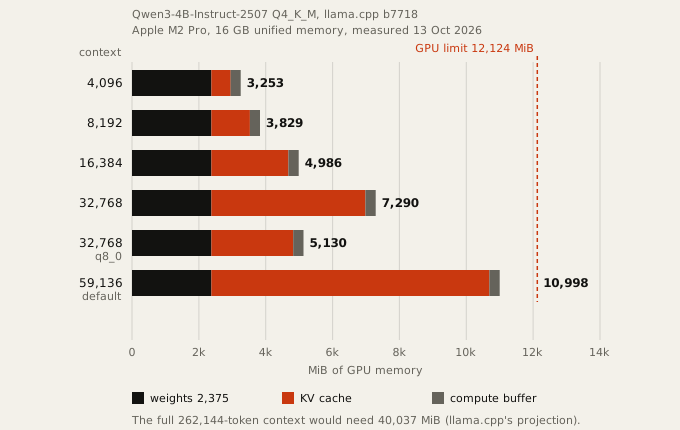
The KV cache llama.cpp allocated was 576 MiB at 4,096 tokens, 1,152 at 8,192, 2,304 at 16,384 and 4,608 at 32,768: exactly 144 KiB per token, matching the formula in every run. The prompt was the same five tokens each time. The cache is sized by the window you allow, and it is reserved in full when the model loads.
That is the practical meaning of a model's advertised context. Qwen3-4B-Instruct-2507 supports 262,144 tokens; at 144 KiB a token, a cache for the full window is 36 GiB, more than 15 times the size of the 2.3 GiB weights file. The full logs, the scripts and a table of every run are kept on file with our research record.
Why a 4-bit model fills the card
A small model fills a large card because the runtime decides how much context, or how much cache, to reserve, and every major runtime now reserves as much as it can by default.
llama.cpp: the model's full context, cut down to fit
In llama.cpp the context size option -c defaults to 0, which the server documentation defines as "loaded from model": the model's training context. The --fit option, on by default since it was merged on 15 December 2025, then shrinks that context until everything fits with a 1,024 MiB margin per device, which --fit-target changes, and only after that starts moving weights to system memory. A context you set yourself is left alone.
In our default run, with no -c, llama.cpp logged that the 262,144-token window was "projected to use 40037 MiB of device memory", cut it to 59,136 tokens, and allocated an 8,316 MiB cache. The model then occupied 10,998 MiB, 91% of the 12,124 MiB that Metal lets the GPU use and 67% of the Mac's 16 GiB, to answer a five-token prompt. That is the largest window the card could hold, and on a 16 GB Mac it leaves little memory for anything else: in three repeat runs the default setting generated 41, 56 and 11 tokens a second against 42, 57 and 56 with -c 32768, and our first default run, made while the Mac was busy with other work, managed 0.09. If you want the memory back, set -c to the context you need.
vLLM: a fixed share of the GPU, whatever the model
vLLM takes a fixed fraction of each GPU and turns everything left after the weights into KV cache. The optimisation guide says "vLLM pre-allocates GPU cache using this percentage of memory," the percentage being gpu_memory_utilization. Its default was 0.9 until vLLM 0.20.0 (27 April 2026), which raised it to 0.92 when CUDA graph memory started being counted inside the budget. So a 4-bit model on a 24 GiB card shows about 22 GiB used in nvidia-smi the moment the server is up, and lowering max_model_len does not change that number; it changes how many requests of that length the reserved cache can hold at once, which vLLM prints at startup as "Maximum concurrency".
A thread on NVIDIA's developer forum from 5 July 2026 shows the confusion. The poster ran a 4-bit Gemma 4 31B in vLLM 0.23.0 split by pipeline parallelism across an RTX 4090 (40 layers) and an RTX 5070 Ti (20 layers), with the fraction set to 0.94, saw 22 GB and 14 GB used, and asked where the memory had gone. By our reading of the log they posted, nothing was missing: on the 4090, 13.46 GiB of weights and a 7.64 GiB KV cache account for most of the 94%, and the remaining roughly 1.4 GiB, which the log does not itemise, would be activations and overhead. vLLM had even shrunk the model's 262,144-token context to 193,760 to fit the cache it had reserved.
To make vLLM use less, lower --gpu-memory-utilization or set --kv-cache-memory-bytes, which the engine arguments reference says overrides the fraction.
Ollama: a small default that depends on your card, and silent truncation
Ollama goes the other way. Its context length documentation sets the default window by available VRAM: 4k tokens below 24 GiB, 32k from 24 to 48 GiB, and 256k at 48 GiB or more, a scheme added on 2 February 2026; before that the default was 4,096, raised from 2,048 in April 2025. Unless a request sets truncate to false, a chat that exceeds the window is not rejected: Ollama's server code keeps the system prompt and the latest message, drops older messages, and logs that only at debug level, so you see it only with OLLAMA_DEBUG=1 and the response says nothing. Users have been tripped by it for years: in January 2025 the author of the coding tool aider wrote on Hacker News that Ollama "silently discards the leading context."
The small default keeps memory low, so Ollama rarely fills a card on its own, but a model that seems to forget the start of a long document is usually running out of window, not intelligence. Set num_ctx in the request options or OLLAMA_CONTEXT_LENGTH for the server, and check the CONTEXT column in ollama ps. Ollama's own documentation suggests at least 64,000 tokens for agents and coding tools.
Why calculators overstate memory for newer attention designs
Most VRAM calculators apply the full-attention formula to every layer, which is right for Llama 3.3 or Qwen3-32B and wrong for many newer models. Gemma 3, gpt-oss, DeepSeek V3.1 and Qwen3-Next each cut the cache a different way, and their configs say how. We worked out each model's cache from its config.json:
| Model | Attention design | KV per token, 16-bit | At 131,072 tokens | Full-attention formula | Overstated by |
|---|---|---|---|---|---|
| Llama 3.3 70B | full attention (GQA), 80 layers | 320 KiB | 40.0 GiB | 40.0 GiB | 1x |
| Gemma 3 27B | 52 sliding-window layers, 10 global | 80 KiB + 416 MiB fixed | 10.4 GiB | 62.0 GiB | 6x |
| gpt-oss-120b | 128-token window on half the layers | 36 KiB | 4.5 GiB | 9.0 GiB | 2x |
| DeepSeek V3.1 | multi-head latent attention (MLA) | 68.6 KiB | 8.6 GiB | 610 GiB | 71x |
| Qwen3-Next 80B | 36 linear layers, 12 attention layers | 24 KiB + 38 MiB fixed | 3.0 GiB | 12.0 GiB | 4x |
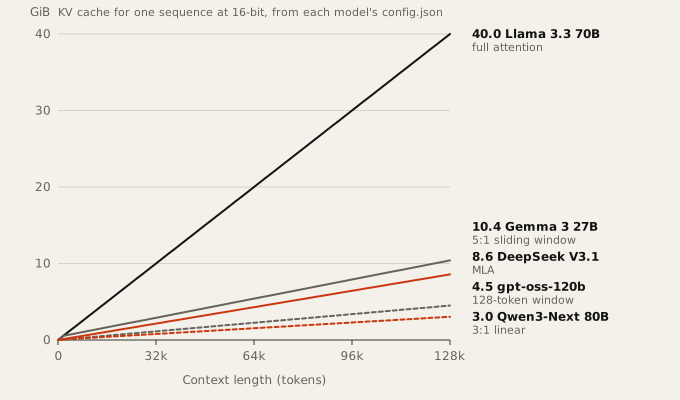
These savings are real only if the runtime implements them, so each subsection says which runtimes do.
Sliding-window attention: Gemma 3 and gpt-oss
In a sliding-window layer each token attends only to the most recent few tokens, so that layer's cache stops growing once the window is full. The Gemma 3 technical report uses "a pattern of 5 local layers for every global layer" with a span "of only 1024 tokens" for the local ones. Gemma 3 27B has 62 layers, 52 local and 10 global, with 16 KV heads of dimension 128. The 52 local layers hold at most 1,024 tokens each, a fixed 416 MiB; only the 10 global layers grow, at 80 KiB a token.
gpt-oss alternates "banded window and fully dense patterns, where the bandwidth is 128 tokens", according to its model card. Half the layers, 18 of 36 in the 120b model and 12 of 24 in the 20b, keep a full cache of eight KV heads of dimension 64; the rest keep 128 tokens. That is 36 KiB a token for gpt-oss-120b and 24 KiB for gpt-oss-20b.
llama.cpp keeps a small sliding-window cache by default; the full-size cache is an opt-in --swa-full flag, and the change that introduced it sizes the window cache at about the window per sequence plus one batch. vLLM's hybrid KV cache manager does the same for gpt-oss and Gemma 2 and 3, reserving slots "only for the most recent sliding_window_size tokens", though its own design notes say the Gemma 3 case still wastes some memory.
Multi-head latent attention: DeepSeek V3.1
DeepSeek's multi-head latent attention caches one compressed vector per layer per token instead of keys and values for every head: 512 numbers plus a 64-number positional key in the DeepSeek-V2 paper, sizes that DeepSeek-V3 and V3.1 keep across 61 layers. That is 576 × 61 × 2 bytes = 68.6 KiB a token, where a calculator that applies the full formula to its 128 heads gets 4.8 MiB, 71 times too much. vLLM and llama.cpp both store the compressed form, llama.cpp since April 2025 and only for GGUF files converted after that. None of this makes DeepSeek V3.1 a home model: its 671 billion parameters are hundreds of GiB at any useful quantisation.
Linear attention layers: Qwen3-Next
Qwen3-Next replaces most attention layers with Gated DeltaNet layers, which keep a fixed-size state per sequence instead of a cache that grows. The model card gives the layout as 12 blocks of three DeltaNet layers and one attention layer, with two KV heads of dimension 256 in the attention layers. Only those 12 layers grow, at 24 KiB a token. By our arithmetic from the config, the 36 DeltaNet layers' state comes to about 38 MiB at 16-bit, whatever the context length.
The full-attention formula overstates Qwen3-Next by four times at 131,072 tokens. vLLM's hybrid cache manager lists Mamba-style hybrids among the models it handles; we did not confirm how it classifies Gated DeltaNet layers, so check the KV cache size vLLM prints at startup rather than trusting either number.
Mixture of experts and several conversations
In a mixture-of-experts model, total parameters set memory and active parameters set speed. Qwen3-30B-A3B has 30.5 billion parameters, so its Q4_K_M file is 17.3 GiB, like a dense 30B model; it uses about 3 billion of them per token, so on hardware that holds it, it generates far faster than a dense 30B. gpt-oss-120b has 116.8 billion parameters with 5.1 billion active. The KV cache follows the attention layers, not the experts: Qwen3-30B-A3B's 48 layers with four KV heads cost 96 KiB a token, against 256 KiB for the dense Qwen3-32B. Because each token touches only a few experts, these are the models that run tolerably with part of the weights in system RAM; llama.cpp's --cpu-moe keeps all expert weights on the CPU and --n-cpu-moe N keeps those of the first N layers there.
Several conversations at once multiply the cache, not the weights. Four simultaneous 32,768-token conversations on Qwen3-32B need 4 × 8 GiB = 32 GiB of cache at 16-bit, on top of 18.4 GiB of weights. vLLM fits as many sequences as its reserved cache holds, and prefix caching lets requests that share a prompt share its blocks, as our prompt caching explainer describes. In llama.cpp, -np sets the number of parallel sequences, and they share the context you set.
Apple silicon: unified memory still has a GPU limit
On a Mac the GPU shares system memory but cannot use all of it. Metal reports a recommendedMaxWorkingSetSize, which Apple describes as how much the GPU "can allocate without affecting its runtime performance". On our 16 GB M2 Pro it was 12,713 MB, which llama.cpp reported as 12,124 MiB, about 74% of the machine's memory. Apple does not publish the formula.
The mlx-lm documentation gives a way to raise the limit on macOS 15 and later, sudo sysctl iogpu.wired_limit_mb=N, with N larger than the model and smaller than the machine's memory. Users in llama.cpp's issue tracker report that the setting resets when the Mac restarts, and whatever the GPU takes, macOS and your other apps do not get.
How to shrink the KV cache: a shorter window or a quantised cache
The cheapest saving is the context window. Set it to what your work needs: -c in llama.cpp, --max-model-len in vLLM, num_ctx in Ollama. At 144 KiB a token, the difference between a 32,768-token window and the 262,144 that Qwen3 4B advertises is 31.5 GiB.
The second is storing the cache at lower precision. In our runs at 32,768 tokens, -ctk q8_0 -ctv q8_0 cut Qwen3 4B's cache from 4,608 MiB to 2,448 MiB, 53% of the 16-bit size, and q4_0 cut it to 1,296 MiB, 28%. The q8_0 run gave the same greedy output as 16-bit; the q4_0 run changed the continuation after "Paris." in our one test prompt, which is an observation from a single run, not a quality measurement. In llama.cpp a quantised V cache needs Flash Attention, which is set to automatic by default.
The rule of thumb: if the weights file is more than about three quarters of your GPU's memory, the context window, not the model, is the thing you are choosing, so work it out with the rule above and set it yourself.